Evaluating the 3D Killer Whale SVG for Digital Crafting Projects
Selecting the right digital asset for a crafting project involves more than just aesthetic preference; it requires an understanding of file compatibility, software limitations, and the specific capabilities of your cutting machine. The 3D Killer Whale SVG has emerged as a popular choice among crafters looking to create dimensional art, but its utility depends heavily on how well the provided formats align with your technical workflow. This evaluation breaks down what makes this specific design distinct, how its multi-format package serves different user needs, and where it fits within the broader landscape of digital cutting files.
Understanding the Distinctive Nature of 3D Vector Designs
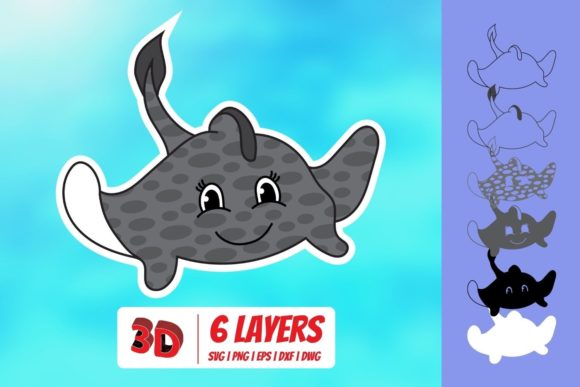
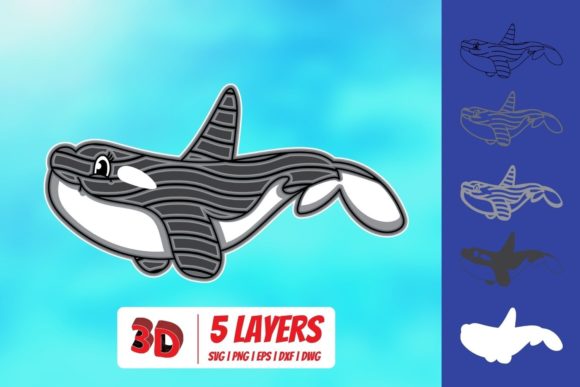
A standard SVG (Scalable Vector Graphic) typically consists of flat paths that a cutting machine follows in a single plane. In contrast, a 3D Killer Whale SVG is engineered differently. These designs often utilize layered vector paths, score lines, or specific cut instructions that allow the final physical product to have depth, shadow, and texture. When you purchase a file described as "3D," you are usually acquiring a blueprint for assembly rather than a simple silhouette.
The primary distinction here is the intent behind the geometry. While a basic whale outline might be used for a simple t-shirt decal or a single-layer vinyl sticker, a 3D version is designed for wall art, pop-up cards, or multi-material displays. The visual impact comes from the interplay of light and shadow created by overlapping layers. Therefore, when evaluating the 3D Killer Whale SVG, it is crucial to recognize that the value lies not just in the image itself, but in the structural logic embedded within the vector data.
File Format Compatibility and Software Ecosystems
The true test of any digital crafting resource is its accessibility. The package associated with this 3D Killer Whale SVG includes a zipped folder containing SVG, DXF, PNG, and EPS formats. This variety is significant because it accommodates a wide spectrum of users, from beginners using entry-level software to professionals utilizing advanced design suites. Understanding the strengths of each format helps determine if this download meets your specific technical requirements.
SVG: The Standard for Modern Cutting Machines
The SVG format is currently the industry standard for most direct-to-machine cutting workflows. The inclusion of the SVG in the download ensures compatibility with leading software platforms such as Cricut Design Space, Silhouette Designer Edition, Make The Cut (MTC), Sure Cuts A Lot (SCAL), and Brother ScanNCut Canvas. For users who own these machines, the SVG file allows for direct import, scaling, and arrangement without needing intermediate conversion steps.
However, it is important to note that while the file is compatible, the ease of use varies by platform. Cricut Design Space, for instance, sometimes simplifies complex vector data upon upload, which can occasionally alter intricate layering intended by the designer. Users should always preview the layers in their specific software before sending the job to the cutter to ensure the 3D effect remains intact.
DXF: Bridging the Gap for Basic Editions
For crafters who prefer Silhouette Studio but do not have the paid Designer Edition, the DXF (Drawing Exchange Format) file is a critical component of the download. The Basic Edition of Silhouette Studio has limited support for native SVG features, particularly regarding color separation and complex layer management. The DXF file acts as a universal translator, allowing these users to import the 3D Killer Whale SVG structure into their software.
This format is particularly useful for users who need to edit the individual shapes manually before cutting. It provides a level of control that bypasses the proprietary restrictions of some cloud-based software. If your workflow relies on precise manual adjustments of the whale’s fins or tail sections, the DXF option offers a robust alternative to the standard SVG.
EPS and Professional Design Tools
The EPS (Encapsulated PostScript) format caters to professional designers and those using desktop publishing applications like CorelDRAW, Inkscape, and Adobe Illustrator. Unlike the direct-cutting focus of SVG and DXF, EPS files preserve high-fidelity vector data, making them ideal for users who wish to manipulate the design further—such as adding custom text, adjusting gradients, or combining the whale with other graphic elements.
For someone creating a large-scale mural or a branded merchandise line, the EPS file ensures that the 3D Killer Whale SVG retains its crisp edges at any size. It is less about immediate cutting and more about design flexibility. If you plan to use the whale as part of a larger composite image, this format provides the necessary resolution and editability.
PNG: Visual Reference and Non-Cutting Uses
Included in the zip folder is a PNG file with a transparent background at 300 DPI. While PNG is a raster format and cannot be directly used by most cutting machines to trace vectors, it serves several practical purposes. It acts as a high-resolution reference image, allowing you to see exactly how the layers will look when assembled. This is invaluable for planning material colors and textures before committing to expensive cardstock or vinyl.
Additionally, the PNG can be used for non-cutting applications, such as printing directly onto paper for scrapbooking, creating digital invitations, or using as a watermark. Its transparency ensures that the whale can be overlaid on any background without a white box surrounding it, maintaining the clean aesthetic expected from professional-grade assets.
Comparative Analysis: When to Choose This Resource
Evaluating whether the 3D Killer Whale SVG is the right choice requires comparing it against other available options, such as single-layer silhouettes or pre-assembled kits. Single-layer SVGs are generally cheaper and easier to produce, but they lack the visual depth that makes 3D designs appealing. If your goal is a simple keychain or a small sticker, a basic outline may suffice, and the complexity of a 3D file might be unnecessary overhead.
On the other hand, pre-assembled kits offer convenience but lack customization. With the digital 3D Killer Whale SVG, you have full control over the scale, material, and color palette. You can choose to print it on thick foam board for a museum-quality display, cut it from adhesive vinyl for a car window, or use metallic cardstock for a decorative piece. This versatility is a major advantage over static physical products.
However, there are tradeoffs. Creating 3D art from vector files requires more time and precision than cutting a single shape. You must carefully align layers, possibly use adhesives between cuts, and ensure your cutting mat holds smaller pieces securely. If you are a beginner looking for a quick, one-step project, this resource might present a steeper learning curve compared to simpler alternatives. Conversely, if you are an experienced crafter seeking to elevate your portfolio with dimensional work, the investment in time pays off in the quality of the final result.
Decision Factors for Buyers
Before downloading the 3D Killer Whale SVG, consider your current software setup. If you rely solely on free or basic versions of cutting software, verify that the included DXF or SVG will import correctly without losing layer information. Test the file in your preferred application first. Additionally, assess your material storage. 3D projects often require multiple sheets of contrasting colors to achieve the desired effect. Ensure you have access to the varied materials needed to bring the whale’s anatomy to life.
Furthermore, consider the end use of the project. Is this for a temporary decoration or a lasting keepsake? The durability of the output depends largely on the materials chosen, not just the vector file. The SVG provides the blueprint, but the longevity of the 3D Killer Whale design rests on the quality of the cardstock, vinyl, or wood you select.
Conclusion on Suitability
The 3D Killer Whale SVG represents a comprehensive solution for crafters interested in dimensional art. Its multi-format approach ensures that users across the skill spectrum—from those using Cricut Design Space to professionals in Adobe Illustrator—can access and utilize the design effectively. While it demands more attention to detail than flat decals, the resulting visual impact justifies the effort for those willing to engage with the layering process. By understanding the specific role of each file type included in the download, you can make an informed decision that aligns with your technical capabilities and creative goals.